In general, you want to store your original raw data that you’d use for your project within a folder in your R Project and never change it. This is because you want to keep the original data intact, so you can always go back to it if you need to. Since the raw data is rarely directly used for analyses, you’d use R to process the data and save the processed data to a new file that you’d then use for your analysis. This workflow is visually represented below in Figure 12.1
In R Projects, the common convention is to keep the raw data in the data-raw/ folder, which is what you’ll do during this section of the pre-workshop tasks. This data-raw/ folder is where you would download or copy the data files you need for your project.
flowchart TD
  data_file("Original<br>data file(s)") -- "Download<br>or copy" --> data_raw[/"data-raw/<br>folder"/]
  data_raw -- "Read only" --> process("Process data with R,<br>raw data not changed")
  process -- "Save"--> data[/"data/<br>folder"/]
Figure 12.1: Workflow for downloading or copying data to the data-raw/ folder and processing it into the data/ folder.
To most effectively demonstrate the concepts in the workshop, it’s best to use a real dataset to apply what you’re going to learn. So for this workshop, you’re going to use an openly licensed dataset from a study assessing physiological stress in nurses during the COVID-19 pandemic, which is called the nurses’ stress dataset (1).
Unfortunately, like most research data, it isn’t very tidy. So we’ve cleaned it up a bit for you to use in this workshop. It’s also a very big dataset, so we’ve made it smaller for you to use but it still is quite large.
Tip
Much of the concepts and skills we will cover in this workshop were used to process and prepare this dataset for you to use in this workshop. If you want to see the code “in action”, check out the clean.R script in this workshop’s GitHub repository.
Since this workshop is about being reproducible and applying modern approaches to data analysis, you’re going to start by writing and saving R code to download the dataset to your R project and save it to a folder called data-raw/. During the workshop we’ll be continuing to process and prepare this dataset for analysis, though we won’t do any statistical analysis during this workshop.
The end goal for this workshop is that you will have a sequence of R code written within the docs/cleaning.qmd Quarto document that will take this raw data and process it into a cleaned and prepared dataset. Processing data for cleaning is something that you will do a lot of in your own work, since most research data is not directly ready to be analysed. As you process the data, you’ll also learn concepts and skills that can be applied to many different tasks and situations.
For now, read the description of the nurses’ stress dataset that was taken from the nurses’ stress study dataset page:
“Advances in wearable technologies provide the opportunity to monitor many physiological variables continuously. Stress detection has gained increased attention in recent years, especially because early stress detection can help individuals better manage health to minimize the negative impacts of long-term stress exposure. This paper provides a unique stress detection dataset created in a natural working environment in a hospital. This dataset is a collection of biometric data of nurses during the COVID-19 outbreak. Studying stress in a work environment is complex due to the influence of many social, cultural, and individuals experience in dealing with stressful conditions. In order to address these concerns, we captured both the physiological data and associated context pertaining to the stress events. We monitored specific physiological variables, including electrodermal activity, heart rate, skin temperature, and accelerometer data of the nurse subjects. A periodic smartphone-administered survey also captured the contributing factors for the detected stress events. A database containing the signals, stress events, and survey responses is available upon request.”
Note
You may be wondering, how can we be using this dataset that has human health data? Isn’t that against GDPR? The short answer is no, it isn’t.
If you went to the dataset page, you may have noticed that the dataset is openly licensed and public, which means you can use it for your own purposes. Yes, it is possible to openly license and make health data publicly available! And no it doesn’t conflict with privacy laws like GDPR. Unfortunately, the way that universities have communicated about GDPR’s impact on and role in research data hasn’t been done very well. They’ve communicated things in a very alarmist, risk-averse way and made their recommendations or policies so generalised to the point of not being useful to specific situations.
So, while GDPR does make it more strict on what can and cannot be shared and requires more detailed information on how the participant’s data will be used when getting prior informed consent, it does not prohibit sharing it or making it public! GDPR and open data are not strictly in conflict with one another.
The standard and conventional way of saving raw data in R is to save it to the data-raw/ folder. There is a helper function for that from usethis. While in your LearnR3 R Project, go to the R Console pane in RStudio and type out:
What this function does is create a new folder called data-raw/ and creates an R script called nurses-stress.R in that folder. This is where we will store the mostly raw (though partly cleaned up) nurses’ stress data that you’ll get from the workshop’s GitHub repository. After running this function, the R script should open up for you, otherwise, go into the data-raw/ folder and open up the new nurses-stress.R script.
The first thing you want do is delete all the code in the script that is added there by default. Then write this library() function at the top of the file:
The here package was described in the Import data session of the introductory workshop and makes it easier to refer to other files in an R project. Read through the section about the here package in the introductory R workshop to learn more.
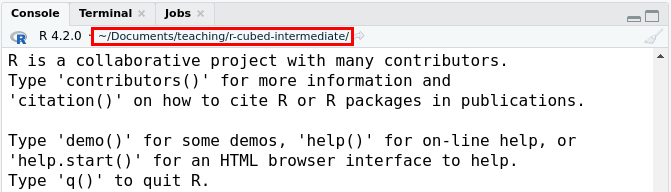
R runs code while working in the current working directory, which you can see on the top of the RStudio Console pane and is shown in the red box inside the image below.
The folder location that R does it’s “work”, called the “working directory”, highlighted by the red box.
When in an RStudio R Project, the working directory is the folder where the .Rproj file is located. When you run scripts in R with source() or when you render a Quarto document, sometimes the working directory will be set to the folder that the R script or Quarto document is located in. So you can sometimes encounter problems with finding files if your code needs to load or use a file and you don’t use a function like here() to link to it. When you use here() it tells R to start searching for files from the .Rproj location.
Let’s use an example. Below is the list of the folders and files you have so far in your R Project.
You don’t need to run the below code, but if you wanted to see the structure and content of a directory, you can use the dir_tree() function from the fs package, which means “filesystem”, by running the following code in the R Console:
Console
# To print the file list.fs::dir_tree("~/Desktop/LearnR3", recurse =1)
If we open up RStudio with the LearnR3.Rproj file and run code in the data-raw/nurses-stress.R, R runs the commands assuming everything starts in the LearnR3/ folder. But! If we run the code that is in the nurses-stress.R script when not in, e.g., RStudio or the R Project, R runs the code in that file by assuming the working directory is the folder that the file is in, which is in the data-raw/ folder. So if you try to load in data in another folder like data/, R will think you mean the data/ folder in the data-raw/ folder, which doesn’t exist! So this can make things tricky. What here() does is to tell R to first look for the .Rproj file and then start looking for the file we actually want from that folder. This might not make sense yet, but as we go through the workshop, you will see why this is important to consider.
Alright, the next step is to download the dataset. Sharing large files isn’t easy, so we’ve put it on Proton Drive, which is a secure EU cloud storage service. Unfortunately, it also means you can’t directly download the data using R. Instead, you have to manually open the link and download the file to your R Project’s data-raw/ folder. But, we still want to have a record of where the data came from. So, open up the data-raw/nurses-stress.R script and paste in this comment below the library(here) line.
data-raw/nurses-stress.R
# The dataset can be downloaded manually from# <https://drive.proton.me/urls/ZHZ6TCAN2W#e5D5U4IajdYp>.# Make sure to save this file to the `data-raw/` folder with the name# `nurses-stress.tar`.
Then, open the link to the dataset and download the tar file to your R Project’s data-raw/ folder with the name nurses-stress.tar (which should be the default).
Because the original dataset is stored elsewhere online, you don’t need to save it to your Git history. Add the tar file to the Git ignore list by typing out and running this code in the Console. You only need to do this once.
Part of reproducibility is ensuring you have a written record of what you did to your data to get to what you are claiming from your analysis. And part of that principle is to “keep your raw data raw”, meaning that you should not directly edit your raw data. Instead, let code do it for you so you have a record of what happened. When you have raw data for a specific project, store it in the data-raw/ folder.
You can untar the tar files by using the untar() function by writing it in data-raw/nurses-stress.R. The first argument of untar() is the tar file you want to untar and the other important argument is called exdir that tells untar() which folder you want to extract the files to. You’ll want to save the output of the tar file to data-raw/nurses-stress/, so write this code at the bottom of the data-raw/nurses-stress.R script:
If you haven’t already, run the code in the data-raw/nurses-stress.R script either line by line by using Ctrl-EnterCtrl-Enter or by source()’ing with Ctrl-Shift-SCtrl-Shift-S or with the Palette (Ctrl-Shift-PCtrl-Shift-P, then type “source”).
Notice the indentation and spacing of the code. Like writing any language, code should follow a style guide. An easy way of following a specific style in R is by using the styler package. We will be using this package regularly during the workshop. You can run it by using the Palette (Ctrl-Shift-PCtrl-Shift-P, then type “style file”) while in RStudio. Try it right now while you are working in the data-raw/nurses-stress.R script.
There probably won’t be anything that changes since you haven’t written much code yet and maybe have copy and pasted it from this website. But since you’ll use this package regularly throughout the workshop, this is a good chance to become more familiar with it.
To make sure you’re aligned with what is described in this pre-workshop tasks, let’s check to make sure your files and folders in data-raw/ align with the files and folders that should be there. You can do this by either running the dir_tree() function from the fs package or you can manually check the files by using the RStudio file pane or by using your file browser.
If your files and folders in the data-raw/ folder do not look like this, start over by deleting all the files except for the nurses-stress.R and nurses-stress.tar files. Then re-run the code from beginning to end.
Since you have an R script that downloads the data and processes it for you, you don’t need to have Git track it. So, in the Console, type out and run this command:
You now have the data ready for the workshop! Now, before continuing, commit your changes to the Git history with Ctrl-Alt-MCtrl-Alt-M or with the Palette (Ctrl-Shift-PCtrl-Shift-P, then type “commit”) and then push those changes to your GitHub by clicking the “Push” button in the Git interface or with the Command Palette with Ctrl-Shift-PCtrl-Shift-P and then typing “push”. Alternatively, you can run this code in the Console to commit and push your changes:
Console
gert::git_add(".")gert::git_commit("Download nurses stress data and save to data-raw/")gert::git_push()
Next step is to please run this function in the Console:
The output should look something a bit like the above text. If it doesn’t, start over by deleting all but the nurses-stress.R and nurses-stress.tar files and running the code from the beginning again. If your output looks a bit like this, then copy and paste the output from the check into the survey question at the end.
12.1 Code used in session
This lists some, but not all, of the code used in the section. Some code is incorporated into Markdown content, so is harder to automatically list here in a code chunk. The code below also includes the code from the exercises.
usethis::use_data_raw("nurses-stress")library(here)# To print the file list.fs::dir_tree("~/Desktop/LearnR3", recurse =1)# The dataset can be downloaded manually from# <https://drive.proton.me/urls/ZHZ6TCAN2W#e5D5U4IajdYp>.# Make sure to save this file to the `data-raw/` folder with the name# `nurses-stress.tar`.usethis::use_git_ignore("data-raw/nurses-stress.tar")untar(here("data-raw/nurses-stress.tar"), exdir =here("data-raw/nurses-stress/"))fs::dir_tree("data-raw/", recurse =2)usethis::use_git_ignore("data-raw/nurses-stress/")gert::git_add(".")gert::git_commit("Download nurses stress data and save to data-raw/")gert::git_push()r3::check_project_setup_intermediate()