We now have several datasets that have a common set of columns, like id and datetime_id, along with the a common datetime unit (minutes). Now we can actually join all the datasets together into a single dataset, which is what we will do during this session.
22.1 Learning objectives
Describe some ways to join or “bind” data and identify which join is appropriate for a given situation. Then apply dplyr’s full_join() function to join two datasets together into one single dataset.
22.2💬 Discussion activity: Recall and share what you’ve learned so far
Time: ~6 minutes.
A very effective way to learn is to recall and describe to someone else what you’ve learned. So before we continue this session, take some time to think about what you’ve learned from yesterday.
Take 1-2 minute and try to recall as much as you can about what you’d done over the last two days. Without looking at your notes or the other sections of the website, try to remember things about importing and robust functions.
Then, for 4-5 minutes, share with your neighbour what you remember and try to describe it to each other. Maybe you will each remember different things.
22.3📖 Reading task: The many ways to join data
Time: ~10 minutes.
NoteTeacher note
Walk through and describe these images and the different type of joins after they’ve read it.
The ability to join datasets together is a fundamental component of data processing and transformation. In many cases, it is required to do before you can meaningfully do any work. Like in our case, we have essentially three datasets that aren’t particularly useful on their own and only really benefit by being joined together. We join them to be able to make comparisons, analyse the variables together, and to work on one dataset rather than three.
But joining datasets can be tricky. There are many ways to join datasets and you often have to do several checks of the data and prepare it in the right way for your needs, like we’ve done, to get a useful and correct output in the end. It can be really easy to not realise that some data was dropped or not included or that extra data was added. It can be extremely frustrating to check and confirm things, but ultimately necessary to continue with doing your analyses and work correctly.
There are many ways to join datasets in dplyr, all of which are described in the ?dplyr::join and ?dplyr::semi_join help documentation. While there are several, only a few are most commonly used. These are left_join(), right_join(), and full_join().
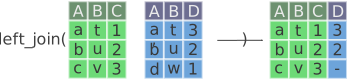
left_join(x, y)
Join all rows and columns in y that match rows and columns in x. Columns that exist in y but not x are joined to x. The number of rows in the joined data is equal to the number of rows in x. If there are some rows in y that don’t match with x, those rows are not included, and so are assigned NA values in the output data.
Figure 22.1: Left joining in dplyr. Notice how the last row in the blue data (the row with d in column A) is not included in the outputted data on the right. Modified from the Posit dplyrcheat sheet. Image license is CC-BY-SA.
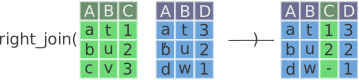
right_join(x, y)
The opposite of left_join(). Join all rows and columns in x that match rows and columns in y. Columns that exist in x but not y are joined to y. Like left_join(), but the opposite, the number of rows in the joined data is equal to the number of rows in y. If there are some rows in x that don’t match with y, those rows are not included and are given an NA value. This function can be useful when used while piping with |> when you are processing data in a sequence of steps and want to continue piping but join a different way then left_join().
Figure 22.2: Right joining in dplyr. Notice how the last row in the green data (the row with c in column A) is not included in the outputted data on the right. Modified from the Posit dplyrcheat sheet. Image license is CC-BY-SA.
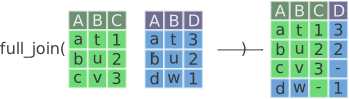
full_join(x, y)
Join all rows and columns in y that match rows and columns in x. Columns androws that exist in y but not x are joined to x. A full join keeps all the data from both x and y. This can be useful if you want to make sure you have all the data from both datasets, even if it results in more missing values in the output data.
Figure 22.3: Full joining in dplyr. Notice how all rows and columns are included in the outputted data on the right, and that some missingness is introduced because those values don’t exist when the data are combined in this way. Modified from the Posit dplyrcheat sheet. Image license is CC-BY-SA.
CautionSticky/hat up!
When you’re ready to continue, place the sticky/paper hat on your computer to indicate this to the teacher 👒🎩
22.4 Joining with dplyr functions
Note🧑🏫 Teacher note
Remind everyone that there will be some things that look odd when joining, but it’s likely due to us only importing the first 100 rows from all the data files.
Walk through the code, the output, and highlight what remains after the join.
Let’s use some of dplyr’s join functions! We’ll start by joining the survey_long with the survey_tidy datasets together. We’ll probably want to use full_join(), but let’s test out the other two joins first. In your docs/learning.qmd file, go to the bottom of the file and make a new header called ## Joining datasets. Below that make a new code chunk with Ctrl-Alt-ICtrl-Alt-I or with the Palette (Ctrl-Shift-PCtrl-Shift-P, then type “new chunk”). We’ll start with using left_join() to join the two datasets together.
First, let’s look at the two datasets before joining them.
Notice the number of rows in each dataset. The survey_long dataset has 3047 rows and the survey_tidy dataset has 100 rows. When we left_join() them, there should no more than 3147 rows (survey_tidy plus survey_long) in the output. There will likely be less because, remember, we have only imported the first 100 rows of each dataset. Let’s join them with left_join().
docs/learning.qmd
survey_long|>left_join(survey_tidy)
Joining with `by = join_by(id, datetime_id)`
Warning in left_join(survey_long, survey_tidy): Detected an unexpected many-to-many relationship between `x` and `y`.
ℹ Row 852 of `x` matches multiple rows in `y`.
ℹ Row 2 of `y` matches multiple rows in `x`.
ℹ If a many-to-many relationship is expected, set `relationship =
  "many-to-many"` to silence this warning.
Ok, we got a warning about “many-to-many” joins. When you get this warning, this means there are duplicate ID values. This type of thing usually requires manual investigation and correction. For now, let’s just identify which IDs are the duplicates. A very easy way to check that is by combining count() and filter() from dplyr. Let’s check for duplicates in the id and datetime_id columns, since those are our unique observational identifiers. Let’s start with the count().
See how all the n values that we can see are 1? That means for that combination of id and datetime_id, there is only one. Which is what we want. To find which are duplicates we use filter() to find any rows where n > 1.
# A tibble: 2 × 3
  id    datetime_id             n
  <chr> <dttm>              <int>
1 6B    2020-05-08 17:01:00     2
2 7A    2020-06-23 13:40:00     2
Alright, it seems we have some duplicate identifiers. For this workshop, we won’t do anything about it, as it requires reviewing the documentation, understanding the context that the data was created in, and then deciding how to handle those duplicates. But this information tells us why we are receiving the warning. We’ll just ignore the warnings for now.
Let’s continue and try with the right_join(). This should give us about the same number of rows as survey_tidy, which is 100, plus those duplicates.
docs/learning.qmd
survey_long|>right_join(survey_tidy)
Joining with `by = join_by(id, datetime_id)`
Warning in right_join(survey_long, survey_tidy): Detected an unexpected many-to-many relationship between `x` and `y`.
ℹ Row 852 of `x` matches multiple rows in `y`.
ℹ Row 2 of `y` matches multiple rows in `x`.
ℹ If a many-to-many relationship is expected, set `relationship =
  "many-to-many"` to silence this warning.
We see that it has the same number of rows as when using left_join(). This isn’t always the case, but in our case it is.
Note
The reason they are the same is because both the survey_long and survey_tidy both come from the same source survey_data. So our joins will all be the same.
Lastly, we’ll use full_join(). Like left_join(), the number of rows can not be more than the sum of the number of rows in both datasets. But it can be less, since, by joining there will be overlap between the two datasets. At a minimum, there can not be fewer rows in the joined data than in the largest of the two datasets, which is in this case survey_long at 3047 rows. Let’s try full_join() to see what happens.
docs/learning.qmd
survey_long|>full_join(survey_tidy)
Joining with `by = join_by(id, datetime_id)`
Warning in full_join(survey_long, survey_tidy): Detected an unexpected many-to-many relationship between `x` and `y`.
ℹ Row 852 of `x` matches multiple rows in `y`.
ℹ Row 2 of `y` matches multiple rows in `x`.
ℹ If a many-to-many relationship is expected, set `relationship =
  "many-to-many"` to silence this warning.
We can see that the number of rows is 3161, which is still less than the sum of the two datasets. We know from the warnings that there are some duplicates, but we’ll keep ignoring those for now.
The full_join() function is most often used because we often want to see all the data we have, even if there are some missing values. Especially considering that some statistical models can use missing values as extra information. Let’s continue the pipe and join the hr_data dataset as well.
Warning in full_join(survey_long, survey_tidy): Detected an unexpected many-to-many relationship between `x` and `y`.
ℹ Row 852 of `x` matches multiple rows in `y`.
ℹ Row 2 of `y` matches multiple rows in `x`.
ℹ If a many-to-many relationship is expected, set `relationship =
  "many-to-many"` to silence this warning.
Joining with `by = join_by(id, collection_datetime)`
Warning in full_join(survey_long, survey_tidy): Detected an unexpected many-to-many relationship between `x` and `y`.
ℹ Row 852 of `x` matches multiple rows in `y`.
ℹ Row 2 of `y` matches multiple rows in `x`.
ℹ If a many-to-many relationship is expected, set `relationship =
  "many-to-many"` to silence this warning.
Joining with `by = join_by(id, collection_datetime)`
In our case, we want all the data from both the survey and the sensor data, since the sensor data will contain more data than the survey data.
We now have the start of a single dataset that we can eventually use for analyses. Let’s do some checks first to make sure everything joined together as we expect. Let’s assign the output of the joins to nurses_stress.
Warning in full_join(survey_long, survey_tidy): Detected an unexpected many-to-many relationship between `x` and `y`.
ℹ Row 852 of `x` matches multiple rows in `y`.
ℹ Row 2 of `y` matches multiple rows in `x`.
ℹ If a many-to-many relationship is expected, set `relationship =
  "many-to-many"` to silence this warning.
Joining with `by = join_by(id, collection_datetime)`
Then use arrange() of the id and collection_datetime columns before piping to View() to make it easier to check the data.
Ok, it looks like we have a lot of missing values. Do we expect that? Maybe. So far we’ve only read in the first 100 rows the HR-type data, so this could be the reason. Until we read in everything, we won’t completely know. But there might also be missing values given that the HR-type data was recorded for many days in a row, while the survey data seems to only contain data on dates that the survey was filled out. But remember, at this stage, we’re only prototyping and testing out the code, it doesn’t have to make sense just yet, as long as the code runs. For now it’s time for you to create the final dataset and then you can check it out in more detail.
22.5🧑💻 Exercise: Join the rest of the data together
Time: ~10 minutes.
Time to put it all together in the docs/cleaning.qmd file.
Restart your R session with Ctrl-Shift-F10Ctrl-Shift-F10 or with the Palette (Ctrl-Shift-PCtrl-Shift-P, then type “restart”) to clear your environment and make sure you have a clean slate.
Open up the docs/cleaning.qmd file and scroll down to the bottom of the file. Make a new header called ## Joining datasets.
Below that, make a new code chunk with Ctrl-Alt-ICtrl-Alt-I or with the Palette (Ctrl-Shift-PCtrl-Shift-P, then type “new chunk”).
In that code chunk, copy and paste the full_join() code you just wrote to join the survey_long, survey_tidy, and hr_data datasets together.
Continue the pipe and using full_join() to join the rest of the datasets, which are ibi_data, temp_data, bvp_data, and eda_data.
Assign the output of the joins to nurses_stress.
Run the code in docs/cleaning.qmd from beginning to end, then run View(nurses_stress) in the Console to check the data.
When you’re ready to continue, place the sticky/paper hat on your computer to indicate this to the teacher 👒🎩
22.6🧑💻 Exercise: Save the final dataset to the data/ folder
Time: ~10 minutes.
The final step is to save the dataset to the data/ folder. But, we also have to make sure to now read in all the data, not just the first 100 rows.
At the bottom of the last code chunk in the docs/cleaning.qmd file, add the code to save the nurses_stress dataset to the data/ folder with write_csv(). Use the here() function to specify the path to save it to. Save it to data/nurses-stress.csv. Why save it there? So that you know that that is the “ready data” and not the raw data. Run the code to make sure that it saves correctly.
Since we don’t want to track this file in Git, run the code in the Console to ignore it with usethis::use_git_ignore().
Open up the R/functions.R file and find the read() function. Find the line that says max_rows = 100 and replace it with max_rows = Inf to read in all the data. (If you did one of the previous exercises to add max_rows argument to read_all(), then you will need to change that instead.)
Go back into docs/cleaning.qmd and render the docs/cleaning.qmd file with Ctrl-Shift-KCtrl-Shift-K or with the Palette (Ctrl-Shift-PCtrl-Shift-P, then type “render”) to make sure everything runs and the dataset is saved correctly. WARNING: This will take a long time to run, so make sure this is the last thing you do here. If your computer isn’t fast enough or powerful enough, you can change the max_rows to 10000 or something similar so that you can at least running all the code and output a large dataset.
Commit the changes with Ctrl-Alt-MCtrl-Alt-M or with the Palette (Ctrl-Shift-PCtrl-Shift-P, then type “commit”) and push to GitHub.
NoteClick for the solution. Only click if you are struggling or are out of time.
When you’re ready to continue, place the sticky/paper hat on your computer to indicate this to the teacher 👒🎩
22.7 Key takeaways
NoteTeacher note
Quickly cover this and get them to do the survey before moving on to the discussion activity.
Knowing how to join datasets together is a fundamental part of data processing and transformation. But it can be also tricky and a source of unexpected issues later on if not done well or not checked.
Use left_join(), right_join(), and full_join() to join two datasets together.
This lists some, but not all, of the code used in the section. Some code is incorporated into Markdown content, so is harder to automatically list here in a code chunk. The code below also includes the code from the exercises.